


Download and export your comic
Choose a file format, download all or selected comic pages, and understand image, PDF, ZIP, and paid export options.
Use this guide for the comic editor at AI Comic Strips. Downloads contain the pages you have already created; choosing another file type does not generate new artwork.
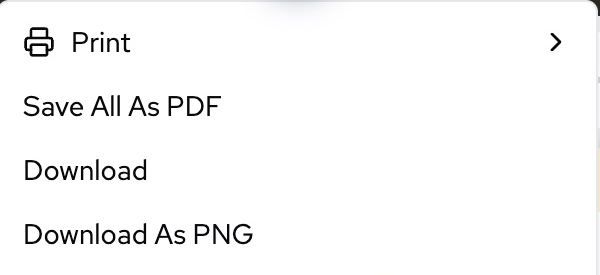
These screenshots show the live product’s English interface. Account details and comic artwork have been cropped out. The control names below match that interface.
Choose Download in this menu to open the format and page-selection settings below.
Download your pages
- Open the saved comic and wait for its images to finish loading. Check dialogue, page order, and the layout before exporting.
- Open the editor's Download control. If you see a menu first, choose Download to open the file settings. Download As PNG opens the same panel with PNG selected.
- Choose File type using the table below. On mobile, use the top download icon, then tap the format name and scroll the format sheet to see all choices.
- Under Select pages, choose All, This page (N), or Custom. For Custom, open the page list and select the individual pages you want. There is no typed page-range field.
- Review the format-specific settings, then choose Download. Keep the editor open while pages are captured and the file is prepared.
- Open the downloaded file outside LlamaGen and verify the selected pages.
The panel starts with All selected each time you open it. Custom selections keep the comic's original page order, rather than the order in which you click the checkboxes. At least one page must be selected before Download becomes available.
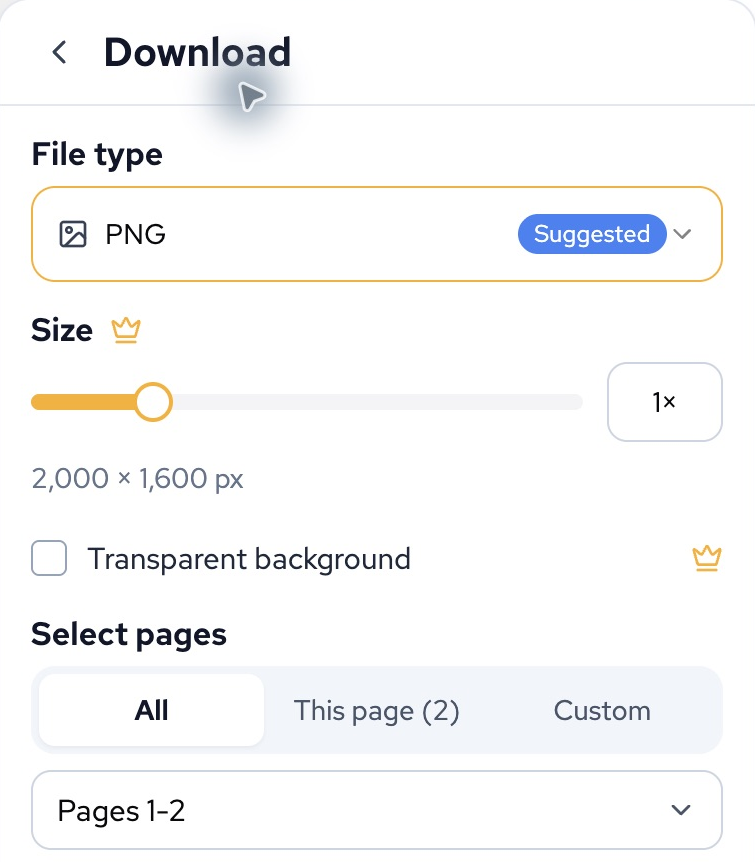
Desktop example from the live product. The current-page number and total page count depend on your comic.
Choose a file type
| File type | Best suited to | What to expect |
|---|---|---|
| PNG | Comic lettering, illustrations, and a clear image copy | The suggested image format. One selected page downloads as a PNG; multiple pages download together in a ZIP. |
| JPG | Sharing pages where smaller image files are useful | One JPG, or a ZIP for multiple pages. Lossy compression can soften small text. |
| WebP | Web publishing and compact image delivery | One WebP, or a ZIP for multiple pages. Check that the receiving app accepts WebP. |
| Reading, review, sharing, and printing | One document containing the selected pages. See paper and print settings. | |
| Classroom pack | A comic with teaching materials | A PDF containing the selected comic pages, an AI-generated worksheet, and an answer key. Review the questions and answers before using them with learners. |
| CBZ Comic Book | A compatible comic-book reader | A comic image archive with reading metadata. Requires a paid plan. |
| SVG | A page capture in an SVG container | It can contain embedded raster images. It is not a promise of editable vector panels, text, or lossless enlargement. Multiple pages download in a ZIP. |
| MP4 Video | A timed video presentation of the selected pages | Requires a paid plan. This export does not generate new character animation. |
| GIF | A looping page preview | Requires a paid plan. GIF has no sound. |
| PPTX | Presenting comic pages in PowerPoint or a compatible app | Requires a paid plan. Check the exported slides in the app you will use. |
You do not need a separate ZIP format for a normal multi-page PNG, JPG, WebP, or SVG download: the download panel packages those pages automatically. A ZIP is a container, not an additional comic page.
PDF and SVG export preserve a rendered page appearance; neither should be treated as a layered project backup. Keep the original LlamaGen project URL if you want to edit the comic later.
The editor may also show separate Download All As ZIP, With History, or With Bubbles entries. These are whole-comic workflows, not the selected-page image download above. Source-asset ZIPs can optimize large images or include a partial-export notice when assets cannot be retrieved. If an archive contains EXPORT_STATUS.txt or EXPORT_IMAGE_OPTIMIZATION.txt, read it before treating the archive as a complete or lossless backup.
Size, quality, and paid settings
Controls change with the selected format:
- Size appears for PNG, JPG, WebP, and SVG. The slider offers 0.25×–4×; a setting other than 1× requires a paid plan. Browser limits may reduce the actual capture size, particularly on mobile. A larger export cannot restore detail missing from the source images.
- Quality appears for JPG and WebP. Balanced is the default; changing the quality setting requires a paid plan. Higher quality usually produces a larger file.
- Transparent background is offered for PNG and WebP with a paid plan. It does not remove backgrounds already painted into generated artwork.
- Paper size, Orientation, and the caption option apply to PDF and Classroom pack. They affect the exported document, not the layout of the editable comic.
- Compress PDF and Download pages as separate files are paid options. Separate PDF files are delivered together in a ZIP; the option applies to ordinary PDF export, not Classroom pack.
A crown or upgrade prompt identifies a paid choice. If an upgrade is not what you intended, return to a standard format and its default settings. Do not assume every format is included in every other LlamaGen workspace.
Check the result
- Extract a ZIP before opening its individual pages. Check the filenames and the number of selected pages.
- Review text at normal reading size and at the size at which you will publish or print it.
- Confirm page order and the intended reading direction in your receiving app.
- For a PDF, inspect page size, margins, and orientation. For video or GIF, play the complete output.
- Keep the project URL with your downloaded copy so you can return to the editable source.
Troubleshooting
| Symptom | What to check |
|---|---|
| Download is disabled | Select at least one page. For a custom PDF paper size, both dimensions must be valid. |
| A file contains the wrong pages | Reopen Select pages and inspect the individual checkboxes. The initial selection is All; a summary showing the first and last page does not mean every page between them is selected. |
| The download is a ZIP instead of an image | Multiple image pages were selected. Extract the ZIP, or choose This page to download one image. |
| An upgrade window opens | Check the format and settings above, including Size, Quality, transparency, and PDF options. |
| The export is too large or fails on a phone | Try one page at 1× and the default settings. For a large project, retry on desktop with fewer memory-heavy tabs open. |
| The file finished preparing but is hard to find | Check the browser's downloads and your device's Files or Downloads app. If the browser opens a preview or share sheet, use its save action. |
| Text or artwork is missing | Wait for page assets to load, then retry once. Compare the editor and the exported page before reporting the issue. |
| Classroom pack cannot generate the worksheet | Check that you are signed in and can access the project. You can download an ordinary PDF while troubleshooting the AI worksheet step. |
If it still fails, contact support with the project URL or artwork ID, selected format and pages, settings, device and browser, time and time zone, and the exact error. Include the filename and byte size if a downloaded file will not open. Do not send passwords or session tokens.
Printing and other workspaces
- For printer steps, paper dimensions, and print limitations, use Print comics and prepare a PDF.
- For a shorter visual workflow, see Export a comic to PDF and Print a comic.
- Storyboard, Manga Editor, Story Workspace, and Animation have their own export controls. See Storyboard PDF export, Manga Editor, or the active workspace's Download/Export menu. Screenplay documents, EPUB, and other specialized exports may appear in separate menus; they are not extra choices in the ten-format comic download panel above.
Was this article helpful?
Autosave, Version history, Archive, and Restore
Understand which controls protect work and how to recover a prior project state without assuming every workspace behaves the same way.
Print comics and prepare a PDF
Print your comic, export selected pages to PDF, choose paper dimensions, and check margins and image quality before printing.